Summary Link to heading
This article is a guided tutorial on the structure, caveats, and methods of updating the bootloader firmware on i.MX8ULP devices using an eMMC. It is intended for people who have some familiarity with the following:
- Basic understanding of the boot flow and files required to boot, “bootloader, kernel,device tree, and rootfs”.
- building an linux based operating system with the Yocto project.
- Coding in C
- Understanding of ioctl.
- Shell scripting
Overview of Environment:
- Machine: NXP i.MX8ULP-EVK
- Repo xml: imx-6.12.49-2.2.0.xml
The term “bootloader firmware” refers to the collection of software required for the multiple processors internal to the i.MX8.
Definitions Link to heading
Below is a list of definitions of all acronyms that are used throughout this guide:
- i.MX8ULP - Industrial Multimedia eXtension Ultra Low Power
- 8th generation of NXPs i.MX application family, ultra low power variant.
- JEDEC - Joint Electron Device Engineering Council
- Global leader in developing open standards and publications for the microelectronics industry.
- RPMB - Replay Protected Memory Block.
- Provides secure storage area on an eMMC (JESD84-B51 sect. 6.2.1).
- MMC - MultiMediaCard
- A memory card standard used for solid-state storage. SD Cards are a good example.
- eMMC - embedded MultiMediaCard
- An MMC designed to be soldered to the PCB with more features. This is a very popular storage method and the subject of this article.
- SoC - System On a Chip
- An integrated circuit that combines most or all key components of a computer or electronic system onto a single microchip.
- EVK - EValuation Kit
- An integrated circuit that combines most or all key components of a computer or electronic system onto a single microchip.
- AHAB - Advanced High Assurance Boot
- NXP’s suite of hardware and firmware working together to implement secure boot.
- ROM - Read Only Memory
- SDP - Serial Download Protocol
- Protocol used in i.MX SoCs to download program images via serial.
Why? Link to heading
While it’s rare to update the bootloader outside of flashing the eMMC with uuu or sdp, it’s good to understand the emmc’s function and role in storing the boot firmware as well as how it allows for fallback updates. This is a guide that contains my personal findings and methods I found for ensuring the bootloader is updated and verified. Bootloader FW updates are often avoided due to:
- Massive risk of bricking devices.
- Removing power as it’s writing would result in corrupted data.
- There’s often no possible recovery from bootloader failures on production devices.
- Security concerns.
- The bootloader FW is often set to an immutable state as you could modify it to load other bad payloads.
- i.MX8’s AHAB verifies the bootloader FW as part of it’s boot ROM, ensuring security of bootloader FW updates.
- Often never needed.
- The responsibilities of the bootloader FW are intentionally minimal to mitigate any need for changes.
Where the data lies on the eMMC Link to heading
Understanding the eMMC memory layout and how it is exposed to the user is crucial for understanding the boot flow.
Partition Layout Overview Link to heading
The eMMC specification is described in the JEDEC document JESD84-B51. An eMMC has its memory divided into different logical areas that appear as different physical devices to the user. The memory areas are:
-
User Area:
- This section is what most users are familiar with. It typically stores the kernel, device tree, rootfs, and other similar files as you would see on other storage devices, such as boot flags and u-boot script.
-
Boot Area:
- Designated area to hold early bootloader software.
- Separated into two partitions (
boot0andboot1). - Partitions can be marked as “Active” or “Inactive” to control which partition to boot from.
-
RPMB Area:
- Secure area requiring authenticated reads and writes that cannot be erased, only written to.
-
Note: You don’t need to use the boot area, you can still setup an eMMC with the same data as an SD card. For this article we assume that we are using the
boot0andboot1partitions in the Boot Area
 Figure 1: eMMC Layout Example
Boot ROM image loading error handling Link to heading
An immediate question you may have is, “What if an active partition gets corrupted, will it still boot”? Luckily (well designed), the Boot ROM has a fallback mechanism.
This is done via the Boot ROMs logic for either the A35 or M33 processor. The below diagram is from the instruction manual itself and is described as:
“The sequence of boot stage moving is Primary image set boot => Secondary Image Set boot => Recovery boot => USB serial download boot”.
In our case Primary Image and Secondary Image are the boot 0 and boot 1 partitions. Either boot 0 or boot 1 could be considered the Primary or Secondary image, depending on which set is the first to attempt to boot.
The mechanism to perform this handling is as follows:
- The SIM_DG0 register is set once at cold boot to the image set described in the eMMC configuration (ext_csd).
- If the image failed to load or authenticate, the Boot ROM updates the SIM_DG0 register to the inactive image set and triggers a watchdog reset.
- If the image fails again, it will boot into the recovery image.
- If that fails, with no recovery image provisioned, the recovery state will directly resolve to SDP mode.
Below is a friendly example of this process, followed by the flowchart from the reference manual:
 Figure 6: Comic of Boot ROM Logic
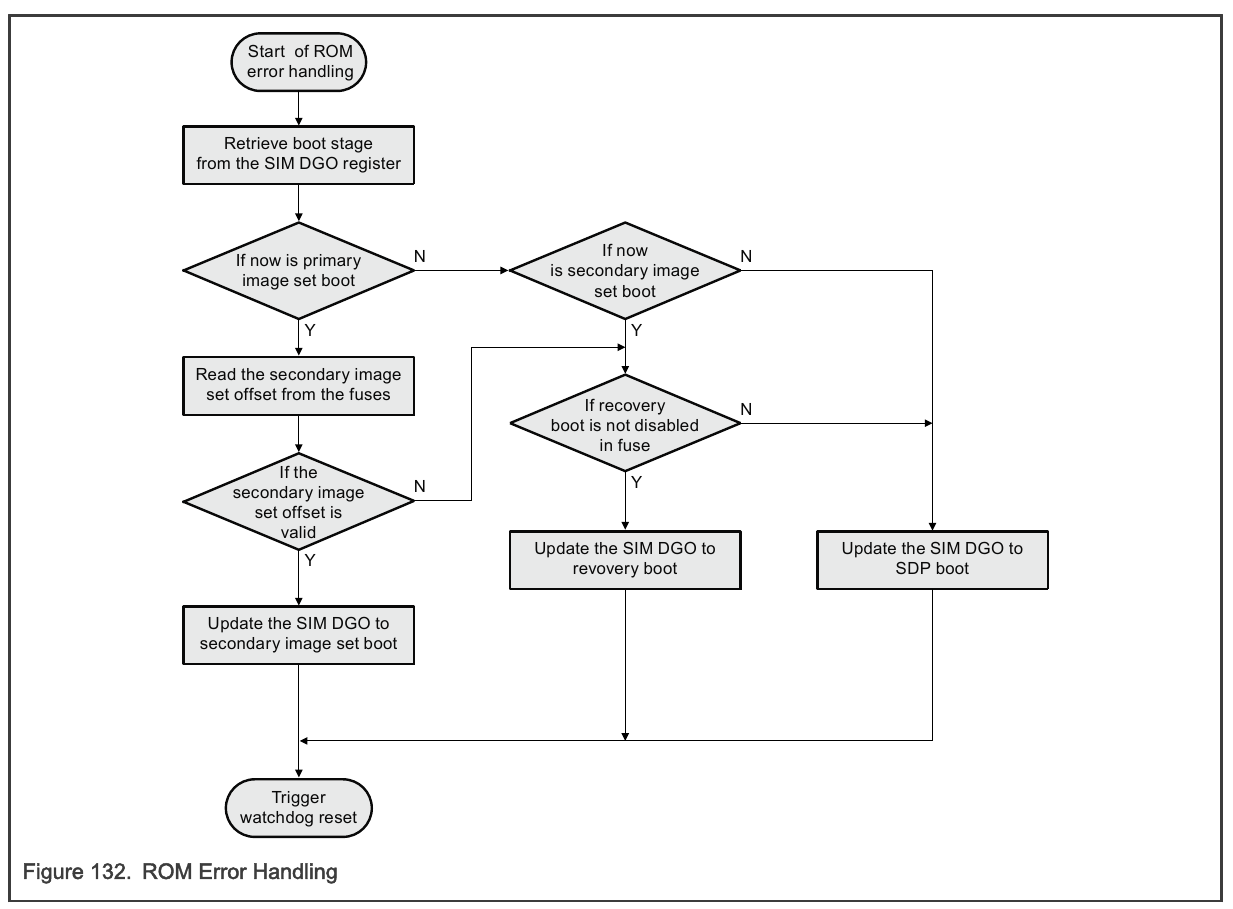 Figure 7: Recovery Boot Flow (i.MX 8ULP Reference Manual. figure 132)
Selecting a Boot partition Link to heading
Part of the eMMC specification includes a 512-byte configuration space where certain values can be written to configure the eMMC. This area is called EXT_CSD(extended card specific data). One of the bytes in the ext_csd is used to configure which boot partition to try and boot from, as well as R/W flags for each partition + RPMB.
From JESD84-B51 (7.4.69)
PARTITION_CONFIG Byte: 179
7 6 5 4 3 2 1 0 Reserved BOOT_ACK BOOT_PARTITION_ENABLED PARTITION_ACCESS Bit 6: BOOT_ACK
- 0x0 : No boot ack sent (default)
- 0x1 : Boot acknowledge sent during boot operation bit
Bit(5:3): BOOT_PARTITION_ENABLE
- 0x0 : Device not boot enabled (default)
- 0x1 : Boot partition 1 enabled for boot
- 0x2 : Boot partition 2 enabled for boot
- 0x3 - 0x6 : Reserved
- 0x7 : User area enabled for boot
Bit(2:0): PARTITION_ACCESS
- 0x0 : No access to boot partition (default)
- 0x1 : R/W boot partition 1
- 0x2 : R/W boot partition 2
- 0x3 : R/W Replay Protected Memory Block (RPMB)
- 0x4 : Access to General Purpose partition 1
- 0x5 : Access to General Purpose partition 2
- 0x6 : Access to General Purpose partition 3
- 0x7 : Access to General Purpose partition 4
From this, we will be using BOOT_PARTITION_ENABLE to read and write the partition number, and PARTITION_ACCESS to set the partition to Read or Write.
Methods to Read and Write Link to heading
There’s a few ways to Read and Write the boot partition data, located in the eMMC’s ext_csd region within Linux. Below are examples of:
1. Writing data to the boot partitions
2. reading and writing the configuration for the boot partition.
Writing Bootloader FW to the Boot Partitions from Userspace Link to heading
The process of reading and writing to the boot partition is very simple in Linux userspace. The PARTITION_ACCESS bits for controlling if you can read and write to the boot partitions are exposed via sysfs, so the scripting required to set the boot partition for writing and actually writing is as easy as an echo to the right spot in sysfs and a simple dd command:
#!/bin/bash

echo 0 > /sys/block/mmcblk0boot0/force_ro

dd \
  if=flash.bin \
  of=/dev/mmcblk0boot0 \
  bs=1K \
  conv=fsync
To flash boot partition 1, just replace mmcblk0boot0 with mmcblk0boot1.
Methods to Read and Write the Boot Partition Configuration Link to heading
Reading the value for the active partition is just as simple, though there are multiple ways to handle this task. There are pros and cons to each method.
script with mmc-utils Link to heading
You can use mmc-utils to get the boot partition from the ext_csd section of the eMMC:
mmc extcsd read /dev/mmcblk0 | grep "Boot Partition" -A4 -B4
Below shows what we are expected to be grepping for:
# mmc extcsd read /dev/mmcblk0 | grep "Boot Partition" -A4 -B4
High-speed interface timing [HS_TIMING: 0x03]
Enhanced Strobe mode [STROBE_SUPPORT: 0x01]
Erased memory content [ERASED_MEM_CONT: 0x00]
Boot configuration bytes [PARTITION_CONFIG: 0x10]
 Boot Partition 2 enabled # <---- this is what we grep
 No access to boot partition
Boot config protection [BOOT_CONFIG_PROT: 0x00]
Boot bus Conditions [BOOT_BUS_CONDITIONS: 0x00]
High-density erase group definition [ERASE_GROUP_DEF: 0x01]
Additionally with mmc-utils, you can set the boot partition easily:
mmc bootpart enable <boot_partition> <send_ack> <device>
You can make a script that can simply and rather reliably toggle the active boot partition:
#!/bin/sh

active="$(mmc extcsd read /dev/mmcblk0 | grep "Boot Partition" | cut -d' ' -f 4)"

if [ $active -eq 1 ]; then
        inactive="2"
elif [ $active -eq 2 ]; then
        inactive="1"
else
        echo "Error, could not get eMMC boot partition info"
        exit 1
fi

mmc bootpart enable $inactive 0 /dev/mmcblk0

echo "old active $active"
echo "new active $inactive"
Pros:
- Simple, easy scripting, only scripting.
- Uses an easily available and long supported tool
Cons:
- Boot Partition grep is flaky in design. Not likely but a change in the format of that output would break the updater. No option for json or other standard format.
- You need to ship with
mmc-utils, which may be seen as bloat to read and write one register.
kerneldebugfs + mmc script Link to heading
Reading the active boot partition via mmc-utils is difficult, while writing it is straightforward. One way to maintain consistency while keeping it to just scripts would be to use debugfs:
#!/bin/bash

ext_str="$(cat /sys/kernel/debug/mmc0/mmc0:0001/ext_csd | tr -d '\n')"

# We want byte 179, since this is hex data
# Below gets what we need, 2 characters at: 2 * 179 = 358
boot_part_char="${ext_str:358:2}"

# Get bits 5-3 for BOOT_PARTITION_ENABLE flags, from JEDEC standard:
# pg 114 , table 70: https://community.nxp.com/pwmxy87654/attachments/pwmxy87654/lpc/27039/1/JESD84-A43.pdf
boot_enabled=$(( (16#$boot_part_char >> 3) & 0x07 ))

echo $boot_part_char
echo $boot_enabled

case $boot_enabled in
  1) echo "0" ;;
  2) echo "1" ;;
  3) echo "Disabled" ;;
esac
Pros:
- More predictable than grepping
mmc-utilsoutput. - Straightforward, not a lot of abstraction.
- Everything for updating stays in a script
Cons:
- Not secure, debugfs most likely won’t be shipped, though, depending on the security use case, it may be fine.
IOCTL Link to heading
The scripting methods have their caveats, though they don’t require any compiling and very little maintaining. For a more concrete, direct, and safer method of reading and writing the ext_csd section, some “real” code is required. Linux exposes the eMMC configuration via ioctl. mmc-utils uses the same ioctls under-the-hood. Writing our own code to interface with the eMMC ioctls has some pros and cons as well:
Cons:
- Requires code to maintain and debug.
- Requires a recipe to compile in Yocto, still more to maintain.
- It is a small piece of code, but must be written carefully since it inherently is less reviewed than open source tools like
mmc-utils
Pros:
- Much more definitive and safe than other methods.
- Much more customizable for specific tasks if required.
C Code for ioctl Link to heading
Definitions for registers and bits are taken from mmc-utils, they are used in the examples below.
The goal is to use ioctl to:
- Ask the eMMC for the contents of it’s
ext_csdsection - Write data to the
ext_csdsection.
This is used to read and write the PARTITION_CONFIG register.
The below code has simple examples of how to perform the basic operations. This process is defined in section 7.2.4 of JEDEC Standard No. 84-A43.
- Write a value in the eMMC’s
ext_csdsection:
// #include <linux/mmc/ioctl.h>
// Table 13 of JEDEC Standard No. 84-A43 contains the expect 32-bit arguments

int write_ext_csd(int fd, unsigned char index, unsigned char value) {
    struct mmc_ioc_cmd cmd = {0};

	// MMC_SWITCH (CMD6): command to set the BOOT_PARTITION_ACCESS bits
    cmd.opcode = MMC_SWITCH;
    cmd.arg =
		// MMC_SWITCH_MODE_WRITE_BYTE Write a single byte
        (MMC_SWITCH_MODE_WRITE_BYTE << 24) |
        (index << 16) |
        (value << 8) |
        0;
	// MMC_RSP_R1B: Configuration to expect a response with crc, opcode, and may send a busy signal.
	// MMC_CMD_AC: Addressed Command
    cmd.flags = MMC_RSP_R1B | MMC_CMD_AC;

	// MMC_IOC_CMD: from 'linux/mmc/ioctl.h'
    return ioctl(fd, MMC_IOC_CMD, &cmd);
}
- Read the eMMC’s
ext_csdsection (512 bytes)
// #include <linux/mmc/ioctl.h>
// Table 13 of JEDEC Standard No. 84-A43 contains the expect 32-bit arguments

int read_ext_csd(int fd, unsigned char *ext_csd) {
    struct mmc_ioc_cmd cmd = {0};

	// Send the EXT_CSD as a block of data
    cmd.opcode = MMC_SEND_EXT_CSD;
    cmd.arg = 0;
	// MMC_RSP_R1: Configuration to expect a response with crc, and opcode. (no busy as with MMC_RSP_R1B)
	// MMC_CMD_ADTC: Addressed Data Transfer
    cmd.flags = MMC_RSP_R1 | MMC_CMD_ADTC;
	// EXT_CSD_SIZE: 512
    cmd.blksz = EXT_CSD_SIZE;
    cmd.blocks = 1;

    mmc_ioc_cmd_set_data(cmd, ext_csd);

	// MMC_IOC_CMD: from 'linux/mmc/ioctl.h'
    return ioctl(fd, MMC_IOC_CMD, &cmd);
}
Next, you can use the above functions to get/set the eMMC boot partition flags:
int get_boot_part(int fd) {
    unsigned char ext_csd[EXT_CSD_SIZE];

    if(read_ext_csd(fd, ext_csd) < 0) {
        // handle error: ioctl reading ext_csd
        return -1;
    }

    unsigned char cfg = ext_csd[EXT_CSD_BOOT_REG];
    unsigned char boot = (cfg >> 3) & 0x7;

    return boot;
}

int set_boot_part(int fd, int part) {
    unsigned char ext_csd[EXT_CSD_SIZE];

    if(read_ext_csd(fd, ext_csd) < 0) {
        // handle error: ioctl reading ext_csd
        return -1;
    }

    unsigned char cfg = ext_csd[EXT_CSD_BOOT_REG];

    cfg &= ~(0x7 << 3);
    cfg |= (part << 3);

    if(write_ext_csd(fd, EXT_CSD_BOOT_REG, cfg) < 0) {
        // handle error: ioctl writing ext_csd
        return -1;
    }

    return 0;
}
Summary Link to heading
In this post, we discussed how using eMMC storage with the standard two boot partitions easily exposes the memory to update the bootloader FW. In addition, we discussed how the i.MX8 boot ROM provides a pseudo A/B update method. Though it may be rare to update or modify bootloader code in anyway, it does happen. Understanding how the eMMC stores firmware and it’s internal workings on i.MX8 boards is crucial to understand it’s boot flow and may come in handy. It’s also just a fun topic to learn. Thanks for reading :)